HubSpot Portal-to-Portal Migration
A full move of a healthcare provider's CRM from one HubSpot account to another while the business kept trading, scripted through the HubSpot API and tracked in a migration ledger. 2,878 contacts, 65 custom fields, tickets and 6,433 activity records moved with zero errors, in dependency order so every association survived. A deduplication engine turns HubSpot's conflict responses into updates, every stage can be re-run safely, delta passes caught records that changed mid-move, and a freeze-window cutover swapped the live website forms and repointed the booking-system sync.
The problem
The provider's whole CRM had to move to a new HubSpot account while it kept trading. Moving records is the easy part. The parts that break quietly are associations (which ticket belongs to which contact and deal), owner assignment (the same person has a different owner ID in each account), dropdown values that do not match between accounts, and everything outside the CRM that still points at the old account: website forms, landing pages and a live booking-system sync.
What was built
A staged migration, scripted through the HubSpot API with n8n and PowerShell, run in dependency order and logged to a migration ledger in Google Sheets, with a readable run report in Google Docs:
- Schema first. Custom properties, property groups and pipelines created in the new account, with an old-to-new ID map.
- Then the records: companies, contacts, deals and tickets. Each stage reads the ID maps the earlier stages wrote, so associations are rebuilt against the new IDs.
- Then the activity history: tasks, emails and notes.
- A deduplication engine hardened over several versions: a 409 conflict from HubSpot becomes an update instead of an error, and a contact can match on any of several normalised phone numbers.
- Cross-account helpers that remap owners and dropdown options.
- Twenty forms rebuilt with an old-to-new ID map, and fourteen landing pages rebuilt and checked.
- Workflows rebuilt in the new account rather than copied.
The hard part
The order is a dependency graph, not a preference. A ticket can only be associated with a contact and a deal that already exist in the new account, so the ticket stage first loads the company, contact, deal and pipeline-stage logs written by the stages before it, and caches the owners and pipelines of both accounts.
Every stage is safe to re-run. Each record is checked against the stage's own log before anything is created. Already there: logged as skipped. New: created, then logged. A crash halfway through a page costs nothing, because the next run picks up where the log ends, and a one-second wait between creates keeps the run inside HubSpot's rate limits.
The business never stopped. A single pass is stale the moment it finishes, so delta passes caught contacts and activities changed after the cutover date, and the cutover itself ran in a freeze window: catch-up loads of 191 contacts and 112 activities, then the five live website forms swapped over and tested, the booking-system sync pointed at the new account, and the online store connected.
What can be verified
- 2,878 contacts, 65 custom fields and tickets moved to the new account
- 6,433 activity records moved, including 2,803 tasks, 2,287 emails and 1,340 notes, with 0 errors, and a sample check came back clear
- 20 forms rebuilt with an old-to-new ID map; 14 landing pages and their 26 images checked by eye
- A freeze-window cutover: catch-up loads of 191 contacts and 112 activities, and 5 live website forms swapped and tested
- The booking-system sync repointed to the new account, and the online store connected with 67 customers synced
- Every stage checks its own log before creating, so a re-run skips what already exists
The workflows
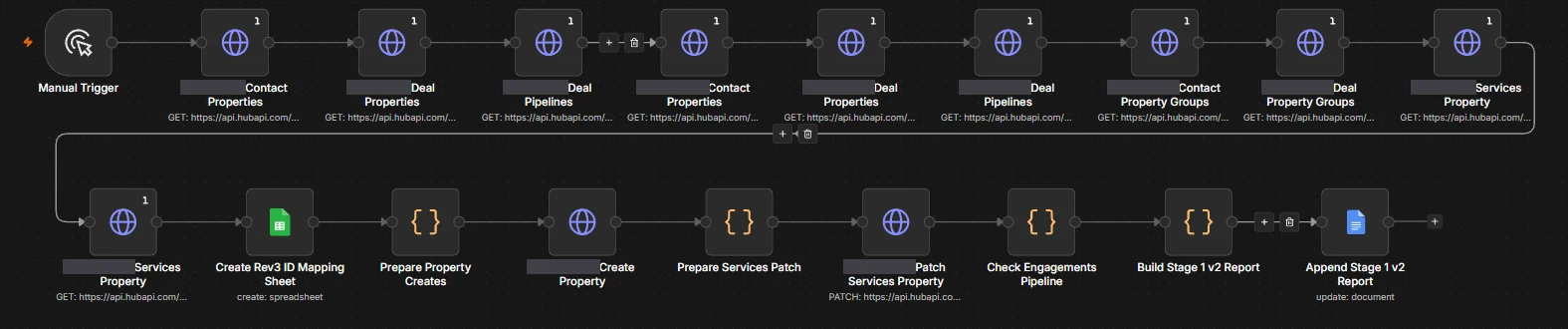 (select to enlarge)
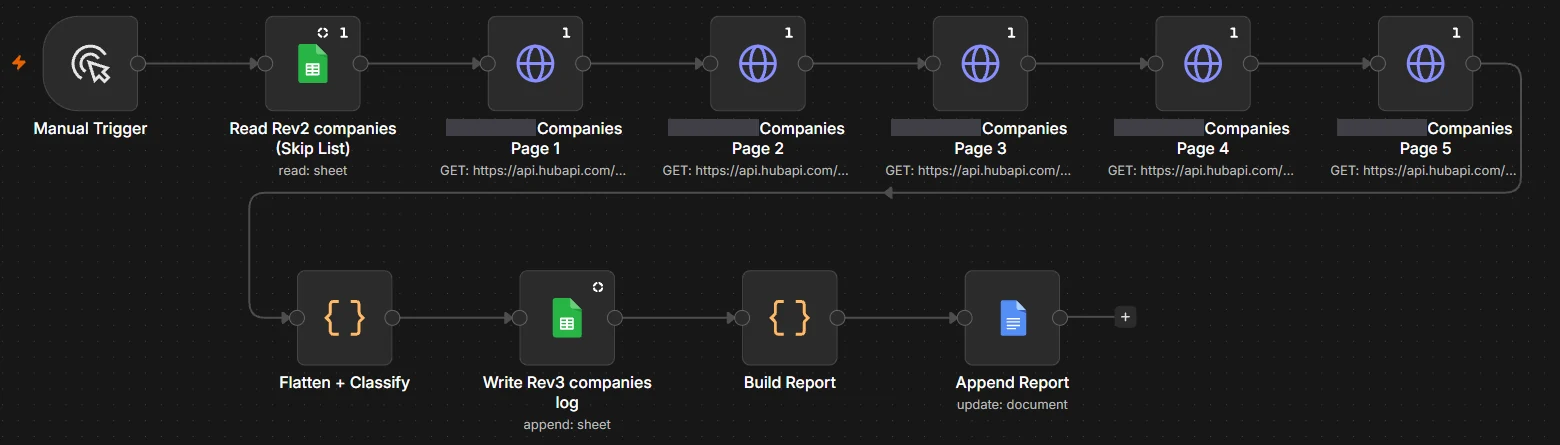 (select to enlarge)
 (select to enlarge)
 (select to enlarge)
On numbers: every figure above is an artefact count or a measured technical value. No business-outcome metric, whether time saved, revenue or conversion, was captured on these engagements, so none is claimed.
On status: reflects repository evidence and platform backups, not a live systems check.