Clinic Inbox Email Assistant
An assistant on a small clinic's shared inbox. Every new email is classified and routed: system mail and newsletters filed by rule, routine questions drafted from the clinic's own knowledge base for staff to send, booking requests answered with the booking link, and anything medical, a complaint or a reported reaction sent straight to the owner in Slack. Every email is categorised and logged. After it handled a cancellation correctly but missed the rest of a patient's email, automatic replies were switched off and it was kept for sorting.
The problem
The clinic's shared inbox was one stream: newsletters, supplier invoices, booking-system and CRM notifications, referrals from other providers, and patients. The urgent email could sit behind the noise, and routine questions took the owner's time.
What was built
A 32-node n8n workflow on the clinic's Outlook inbox:
- Intake: each new email is normalised and de-duplicated, so nothing is processed twice.
- Rules before the model: known system, vendor and internal senders are filed without a model call.
- Classification: a small model returns intent and urgency; a code router, not the model, picks the branch, the Outlook category and the folder.
- Drafts: routine questions get a reply drafted by a larger model from the clinic's knowledge base (the same index as its SMS booking assistant), saved as a draft for staff to check and send. Booking requests get a draft with the booking link.
- Escalation: medical questions, complaints, legal mentions, adverse reactions, provider correspondence and low-confidence classifications go to the owner in Slack, labelled by type.
- Audit: every email is categorised in Outlook and logged to a sheet.
The hard part
A correct action on half an email. For a while the assistant also handled cancellations by email, with deliberately strict rules: it cancelled only on an explicit "cancel", treated anything ambiguous as a reschedule and drafted two open slots instead, and drafted rather than sent when more than one appointment matched. Then a patient asked, in one email, to cancel and also asked other questions. It cancelled correctly and answered nothing else, and the patient was confused. The fix was not another rule: automatic replies were switched off, cancellations went back to a person, and the assistant was kept for what it did reliably, sorting and escalating.
Rules first, model second. Most of the inbox was notifications and newsletters. Filing those by sender before classification cut model calls and kept marketing mail out of the owner's Slack.
What can be verified
- A 32-node workflow, versioned from v1.4 to v2.1 in its own code comments
- Senders filed by rule before any model call
- Six labelled escalation types sent to Slack
- Drafts grounded in the clinic's own knowledge base
- Automatic replies switched off in June 2026 after a real failure, and the bot kept for sorting
The workflow
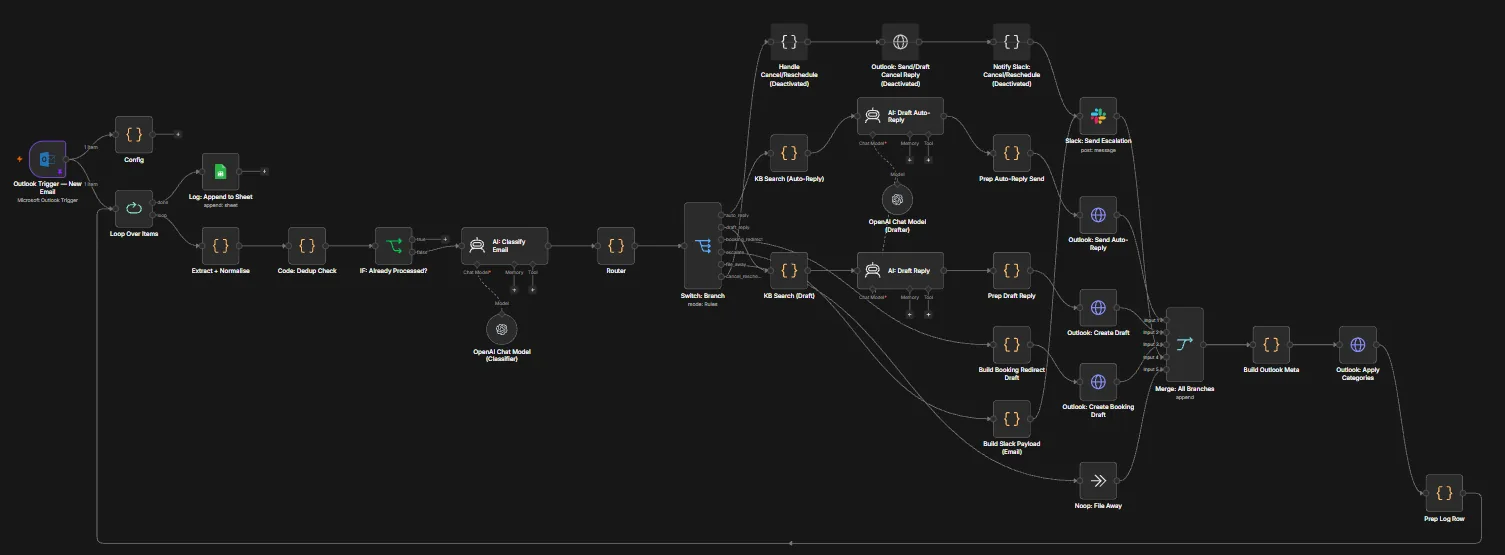 (select to enlarge)
On numbers: every figure above is an artefact count or a measured technical value. No business-outcome metric, whether time saved, revenue or conversion, was captured on these engagements, so none is claimed.
On status: reflects repository evidence and platform backups, not a live systems check.