Post-Bid Follow-Up in the CRM
A multi-week follow-up sequence for a subcontractor's submitted bids, built inside the CRM's own automation tool. The plan allowed only five conditions and ten actions per automation and had no date-based trigger, so the sequence is ten automations chained through a follow-up status field: each sends its email, waits, and hands over to the next. It ran on real deals, and when real use showed the gaps, it was changed to end on a lost or won deal and a small n8n timer was added to start it from the bid date.
The estimator had his own follow-up routine before; I automated it inside the CRM's limits.
The problem
After a bid went to a general contractor, the estimator chased it by hand on a timetable of several weeks: a first follow-up, then no-response reminders, then feedback, revisions and negotiations. Follow-ups slipped when he was busy, and nothing showed where each bid was in the sequence.
What was built
- Ten automations, one per stage: bid submitted (two phases), sequence start, initial task, two no-response parts, feedback and review, revisions and rebids, unawarded, and active negotiations.
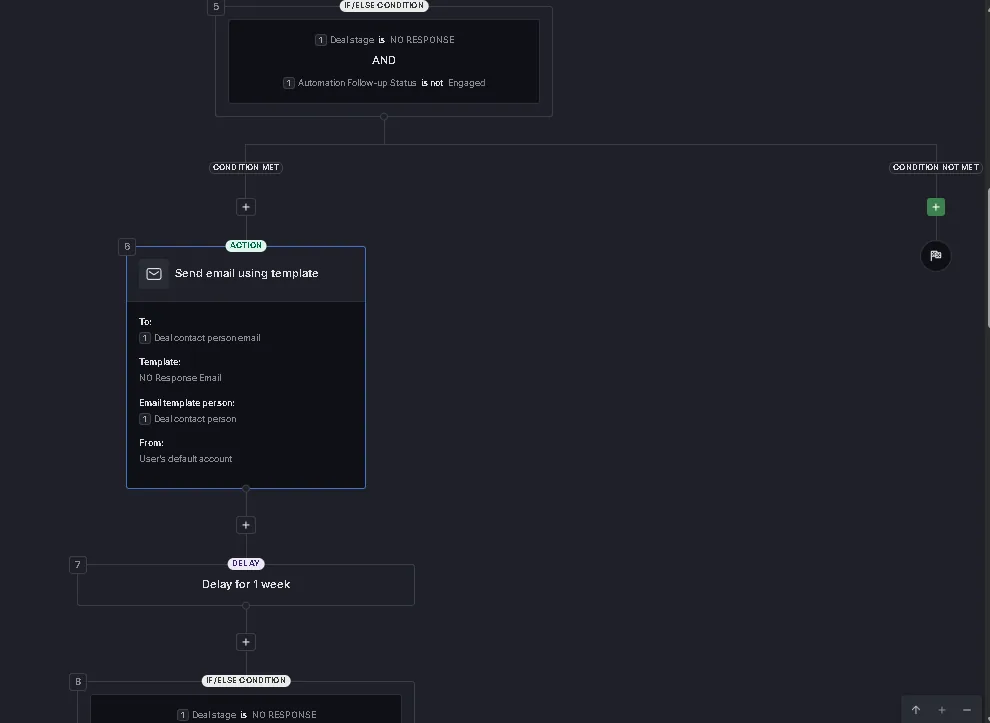
- A follow-up status field on the deal that each automation reads and sets, so they hand over in order and stop for a deal that has already replied.
- Email templates per stage, filled from the deal and its contact.
- An n8n timer (February 2026): a webhook when a bid is submitted, a wait until the bid date, a fresh read of the deal, and an update only if it is still open.
The hard part
Designing to the plan's limits. Five conditions and ten actions per automation, and no trigger on a date. A staircase of follow-ups over several weeks cannot fit in one automation, so it became ten small ones joined by a status field, which also made each stage easy to read and change.
Real use found what testing did not. On live deals the estimator found that marking a project lost did not stop the emails, and that the project name was missing from some of them. The agreed fix was that every follow-up ends when a deal is marked lost or won, and the templates' fields were corrected.
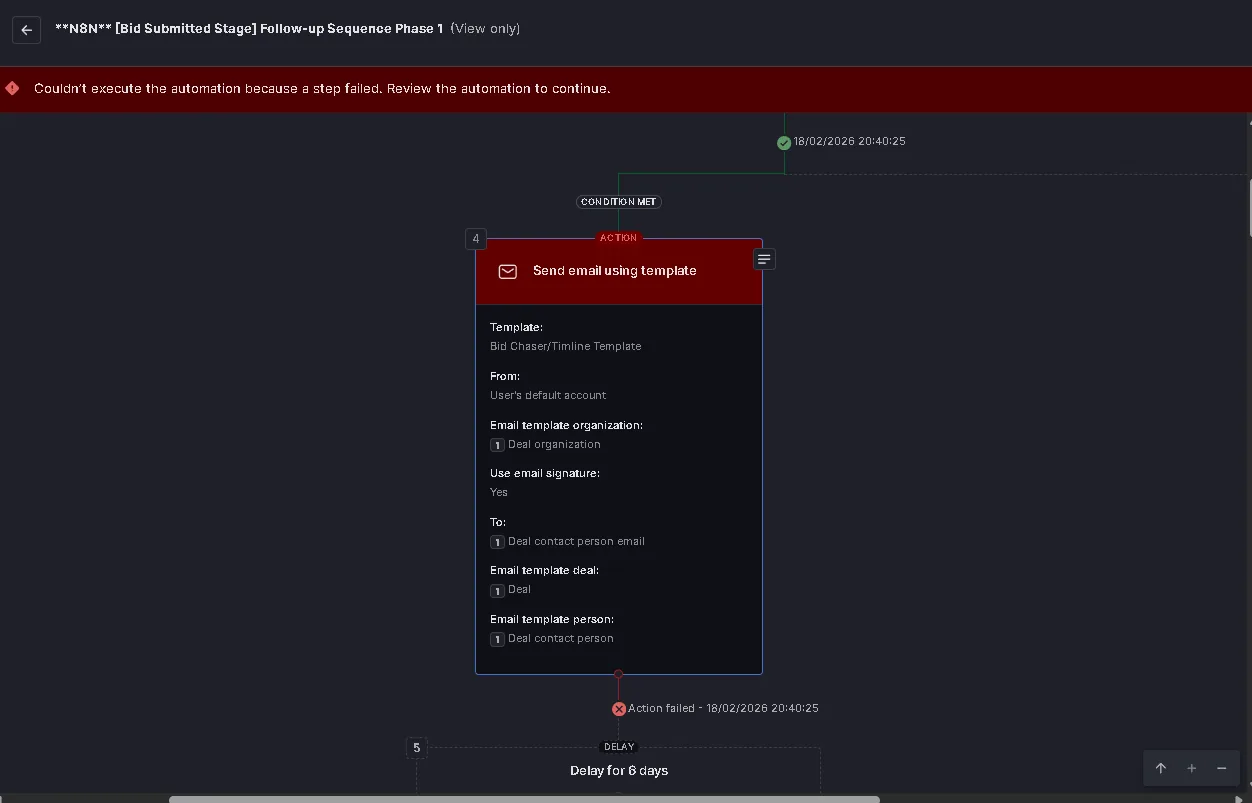
An automation sends as a person. A run started from n8n failed at the email step because the user it ran as had no default email account set in the CRM. It is a one-line configuration fix, and the kind of thing that only shows up on a real run.
What can be verified
- Ten automations chained by a follow-up status field, each within five conditions and ten actions
- Ran on real deals in February 2026
- The n8n timer re-reads the deal and only updates it if it is still open
- A failed run on 18 February 2026 traced to a missing default email account
The workflows
![The Pipedrive automation editor for "[No Response Stage] Follow-up Sequence Part 1 (Weeks 1-4)": step 12 sends an email using the NO Response Email template to the deal contact, step 13 waits one week, and step 14 is an if/else condition.](/assets/post-bid-follow-up-01-sequence-part-1.webp) (select to enlarge)
(select to enlarge)
 (select to enlarge)
 (select to enlarge)
On numbers: every figure above is an artefact count or a measured technical value. No business-outcome metric, whether time saved, revenue or conversion, was captured on these engagements, so none is claimed.
On status: reflects repository evidence and platform backups, not a live systems check.