Estimating & Vendor Outreach AI
Bid preparation for a commercial landscaping subcontractor, broken into small automations. A new deal in the CRM builds the project's folders. The estimator screenshots the plant schedule from the drawing, and Gemini reads it (OCR) into rows in the bid sheet. Then, for plants, materials and subcontracted work, the system finds the right vendors, removes duplicates and drafts one quote-request email per vendor, with an approve-or-reject step in Google Chat. Estimated saving: about six hours of the estimator's manual work a day.
The problem
Bid preparation was mostly typing. For every project the estimator copied plant and material lists off the plan sheets into a bid spreadsheet, set up the project's folders by hand, and emailed vendor after vendor for quotes. He put the plant-list step at a twenty-minute copy-and-paste each time, and wanted it down to a five-minute review.
What was built
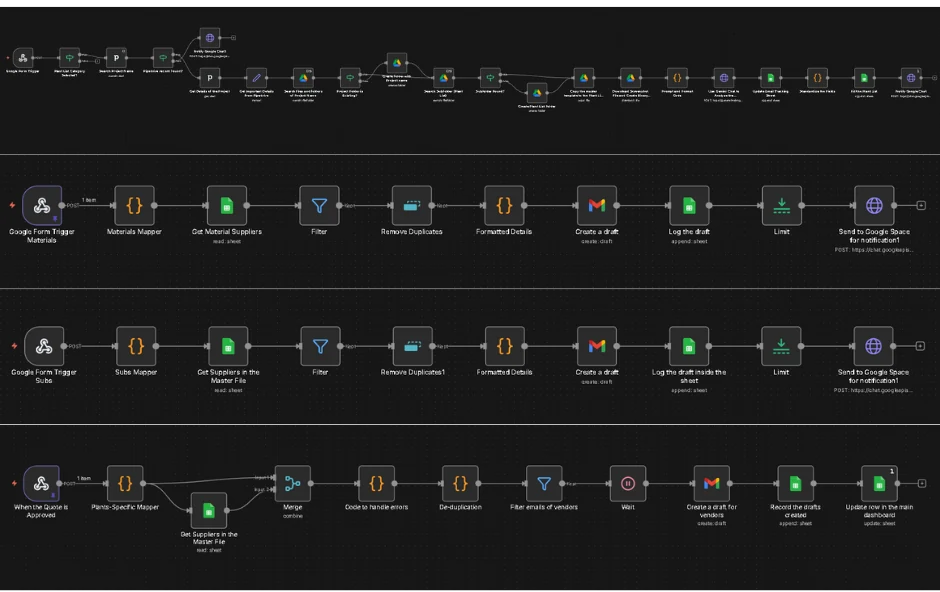
Five n8n workflows, each doing one job so each could be tested on its own:
- Project folders — a new deal in the CRM fires a webhook; the workflow checks it, creates the project's Drive folder with six standard subfolders and two template copies, and posts to Google Chat.
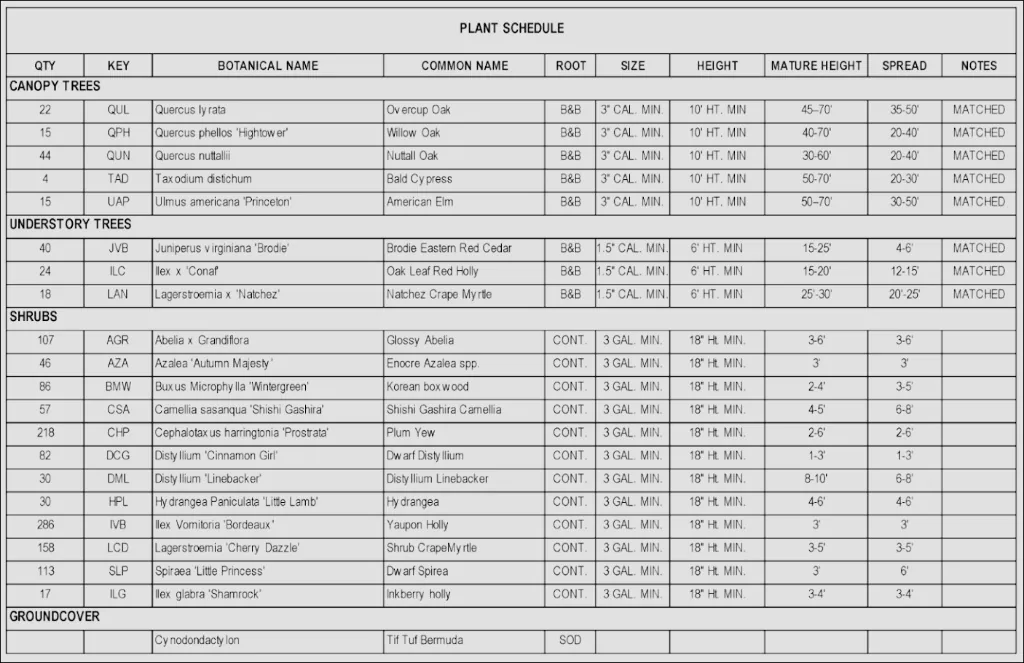
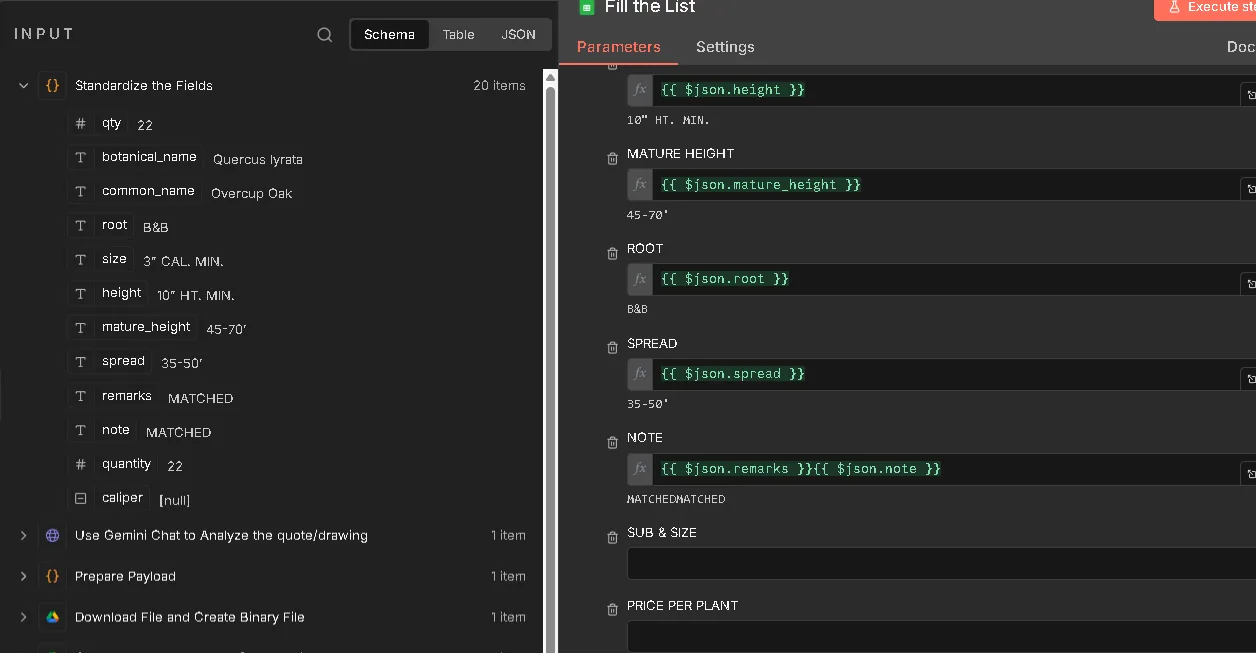
- Plant-list OCR — the estimator submits a form with a screenshot of the plant schedule. The workflow finds the matching deal, sends the image to Gemini, which reads it into rows (quantity, botanical and common name, size, height, root, notes), and writes them into the project's copy of the quotation template.
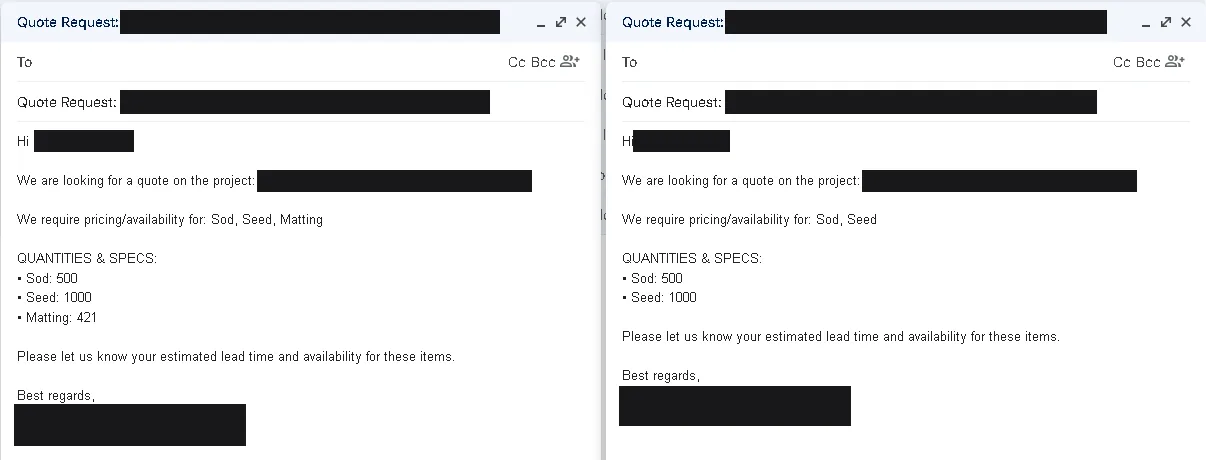
- Vendor quote requests — one workflow each for plants, materials and subcontracted work. Each reads the filled sheet, finds the matching vendors in the master vendor list, removes duplicates, drafts one Gmail quote request per vendor, logs it, and asks for approval in Google Chat.
- A written guide for each workflow, so the team could run them without the builder.
The hard part
Change the input when the extraction is the problem. The first version read whole PDF plan sets, and it was not reliable enough to trust. Rather than keep tuning it, the input changed: the estimator screenshots just the plant schedule. A smaller, cleaner image made the extraction dependable, and the estimator still reviews every row.
Choose the model on the client's own drawings. GPT and Gemini were run on the same sample plan sheets and compared line by line; Gemini was chosen on that test.
One email per vendor, not one per line. A vendor who supplies five items should get one request, not five, so the outreach step groups and de-duplicates before drafting. In one test, eighteen sheet rows became five vendor emails. Nothing is sent until someone approves it in Google Chat.
What can be verified
- Five workflows, built and tested with the estimator between December 2025 and January 2026
- Demonstrated to the business owner and the estimator four times
- GPT and Gemini compared on the same sample plan sheets before choosing Gemini
- In a test, the vendor step reduced 18 sheet rows to 5 vendor emails
- The plant-list and vendor workflows were switched on in February 2026
The workflows
 (select to enlarge)
 (select to enlarge)
 (select to enlarge)
 (select to enlarge)
On numbers: every figure above is an artefact count or a measured technical value. No business-outcome metric, whether time saved, revenue or conversion, was captured on these engagements, so none is claimed.
On status: reflects repository evidence and platform backups, not a live systems check.